font-width CSS property
Limited availability
This feature is not Baseline because it does not work in some of the most widely-used browsers.
Want more browser support for this feature? Tell us why.
Note:
The font-width property is the modern replacement for font-stretch, which is a legacy alias. While font-width is the specification's preferred name, font-stretch currently has broader browser support. Check the fallback example and browser compatibility table for details.
The font-width CSS property selects a normal, condensed, or expanded face from a font.
Try it
font-width: condensed;
font-width: expanded;
font-width: ultra-expanded;
font-width: 50%;
font-width: 100%;
font-width: 150%;
<section class="default-example" id="default-example">
  <p class="transition-all" id="example-element">
    London. Michaelmas term lately over, and the Lord Chancellor sitting in
    Lincoln's Inn Hall. Implacable November weather. As much mud in the streets
    as if the waters had but newly retired from the face of the earth, and it
    would not be wonderful to meet a Megalosaurus, forty feet long or so,
    waddling like an elephantine lizard up Holborn Hill.
  </p>
</section>
@font-face {
  src: url("/shared-assets/fonts/LeagueMono-VF.ttf") format("truetype");
  font-family: "League";
  font-style: normal;
  font-weight: normal;
}

section {
  font-size: 1.2em;
  font-family: "League", sans-serif;
}
Syntax
/* Keyword values */
font-width: normal;
font-width: ultra-condensed;
font-width: extra-condensed;
font-width: condensed;
font-width: semi-condensed;
font-width: semi-expanded;
font-width: expanded;
font-width: extra-expanded;
font-width: ultra-expanded;

/* Percentage values */
font-width: 50%;
font-width: 100%;
font-width: 200%;

/* Global values */
font-width: inherit;
font-width: initial;
font-width: revert;
font-width: revert-layer;
font-width: unset;
Values
This property is specified as a single value from the following list:
normal-
Specifies a normally condensed font face.
semi-condensed,condensed,extra-condensed,ultra-condensed-
Specifies a more condensed font face than normal, with
ultra-condensedbeing the most condensed. semi-expanded,expanded,extra-expanded,ultra-expanded-
Specifies a more expanded font face than normal, with
ultra-expandedbeing the most expanded. <percentage>-
A
<percentage>value between 50% and 200% (inclusive). Negative values are not allowed for this property.
Keyword to numeric mapping
The table below shows the mapping between the keyword values and numeric percentages:
| Keyword | Percentage |
|---|---|
ultra-condensed |
50% |
extra-condensed |
62.5% |
condensed |
75% |
semi-condensed |
87.5% |
normal |
100% |
semi-expanded |
112.5% |
expanded |
125% |
extra-expanded |
150% |
ultra-expanded |
200% |
Description
Some font families offer additional faces in which the characters are narrower than the normal face (condensed faces) or wider than the normal face (expanded faces).
You can use font-width to select a condensed or expanded face from such fonts. If the font you are using does not offer condensed or expanded faces, this property has no effect.
Font face selection
The face selected for a given value of font-width depends on the faces supported by the font in question. If the font does not provide a face that exactly matches the given value, then values less than 100% map to a condensed face, and values greater than or equal to 100% map to an expanded face.
The table below demonstrates the effect of setting different percentage values of font-width on two different fonts:
The following screenshot shows how the above table is rendered, in case your browser doesn't support the font-width property:
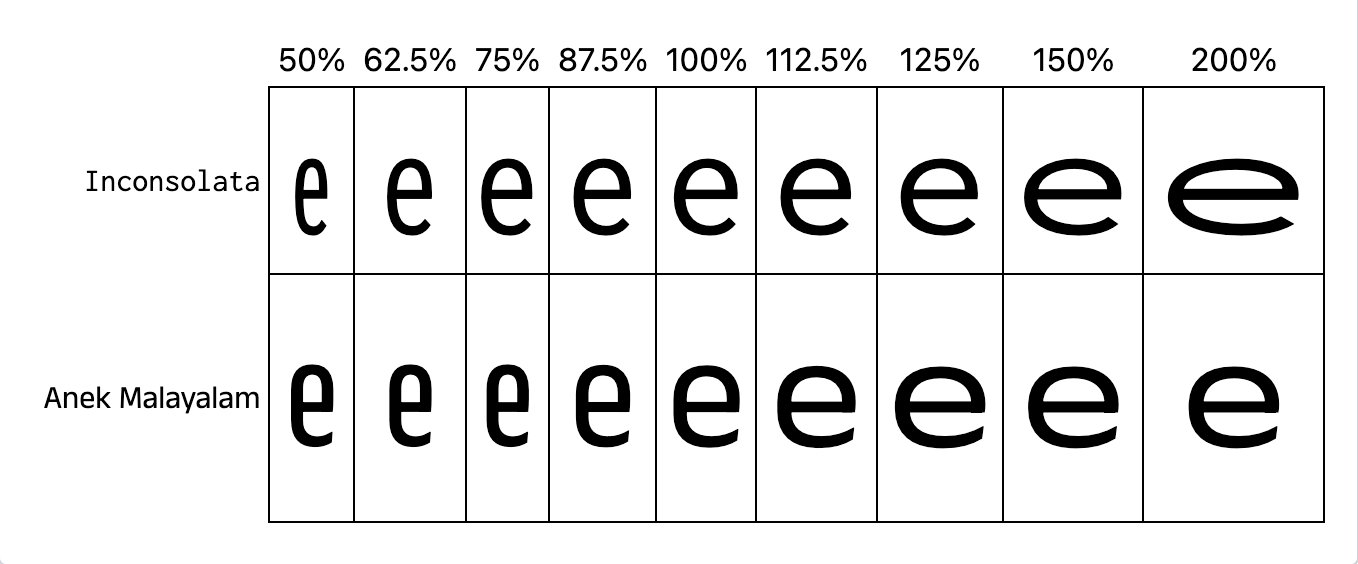
- Inconsolata is a variable font that offers a continuous range of widths from 50% to 200%.
- Anek Malayalam is a variable google font that supports widths from 75% to 125%. Values below and above this range select the closest matching font.
Formal definition
| Initial value | normal |
|---|---|
| Applies to | all elements and text. It also applies to ::first-letter and ::first-line. |
| Inherited | yes |
| Computed value | percentage |
| Animation type | by computed value type |
Formal syntax
font-width =
  normal              |
  <percentage [0,∞]>  |
  ultra-condensed     |
  extra-condensed     |
  condensed           |
  semi-condensed      |
  semi-expanded       |
  expanded            |
  extra-expanded      |
  ultra-expanded
Examples
Setting font width percentages
<p class="condensed">an elephantine lizard</p>
<p class="normal">an elephantine lizard</p>
<p class="expanded">an elephantine lizard</p>
@font-face {
  src: url("/shared-assets/fonts/LeagueMono-VF.ttf") format("truetype");
  font-family: "LeagueMonoVariable";
  font-style: normal;
}

p {
  font:
    1.5rem "LeagueMonoVariable",
    sans-serif;
}

.condensed {
  font-width: 50%;
}

.normal {
  font-width: 100%;
}

.expanded {
  font-width: 200%;
}
Providing a font-stretch fallback
Because font-width does not yet have broad browser support, you may want to include the legacy font-stretch property as a fallback. Place font-stretch before font-width so that supporting browsers use the modern property:
p {
  font-stretch: condensed; /* for browsers that don't support font-width */
  font-width: condensed;
}
Note:
You can automate this fallback pattern using the postcss-preset-env plugin for PostCSS, which includes the postcss-font-width-property transform to convert font-width properties to font-stretch automatically.
Specifications
| Specification |
|---|
| CSS Fonts Module Level 4 # propdef-font-width |
Browser compatibility
See also
font-widthdescriptor for@font-face- Legacy
font-stretchalias property with better browser support font-stylepropertyfont-weightproperty- SVG
font-widthattribute - SVG
font-stretchattribute - Learn: Fundamental text and font styling
- CSS fonts module