Element: mouseenter event
Baseline
Widely available
This feature is well established and works across many devices and browser versions. It’s been available across browsers since July 2015.
The mouseenter event is fired at an Element when a pointing device (usually a mouse) is initially moved so that its hotspot is within the element at which the event was fired.
Note that "moving into an element" refers to the element's position in the DOM tree, not to its visual position. For example, if a child element is positioned so it is placed outside its parent, then moving into the child element will trigger mouseenter on the parent element, even though the pointer is still outside the bounds of the parent element.
Syntax
Use the event name in addEventListener():
addEventListener("mouseenter", (event) => { })
Alternatively, assign to the event handler property of the interface:
onmouseenter = (event) => { }
Event type
A MouseEvent. Inherits from UIEvent and Event.
Usage notes
Though similar to mouseover, mouseenter differs in that it doesn't bubble and it isn't sent to any descendants when the pointer is moved from one of its descendants' physical space to its own physical space. Other than that, enter and over events for the same situation are dispatched at the same time, if appropriate.
Behavior of mouseenter events
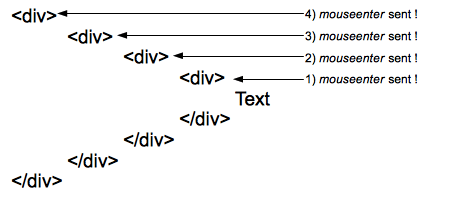
This describes the mouseenter events received by each of four concentric divs with no padding or margin, so the events all happen at the same time:
 One
One mouseenter event is sent to each element of the hierarchy when entering them. Here 4 events are sent to the four elements of the hierarchy when the pointer reaches the text.
Behavior of mouseover events
 A single
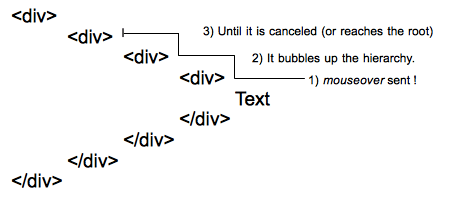
 mouseover event is sent to the deepest element of the DOM tree, then it bubbles up the hierarchy until it is canceled by a handler or reaches the root.
With deep hierarchies, the number of mouseenter events sent can be quite huge and cause significant performance problems. In such cases, it is better to listen for mouseover events.
Combined with the corresponding mouseleave (which is fired at the element when the mouse exits its content area), the mouseenter event acts in a very similar way to the CSS :hover pseudo-class.
Examples
The mouseover documentation has an example illustrating the difference between mouseover and mouseenter.
mouseenter
The following trivial example uses the mouseenter event to change the border on the div when the mouse enters the space allotted to it. It then adds an item to the list with the number of the mouseenter or mouseleave event.
HTML
<div id="mouseTarget">
  <ul id="unorderedList">
    <li>No events yet!</li>
  </ul>
</div>
CSS
Styling the div to make it more visible.
#mouseTarget {
  box-sizing: border-box;
  width: 15rem;
  border: 1px solid #333333;
}
JavaScript
let enterEventCount = 0;
let leaveEventCount = 0;
const mouseTarget = document.getElementById("mouseTarget");
const unorderedList = document.getElementById("unorderedList");

mouseTarget.addEventListener("mouseenter", (e) => {
  mouseTarget.style.border = "5px dotted orange";
  enterEventCount++;
  addListItem(`This is mouseenter event ${enterEventCount}.`);
});

mouseTarget.addEventListener("mouseleave", (e) => {
  mouseTarget.style.border = "1px solid #333333";
  leaveEventCount++;
  addListItem(`This is mouseleave event ${leaveEventCount}.`);
});

function addListItem(text) {
  // Create a new text node using the supplied text
  const newTextNode = document.createTextNode(text);

  // Create a new li element
  const newListItem = document.createElement("li");

  // Add the text node to the li element
  newListItem.appendChild(newTextNode);

  // Add the newly created list item to list
  unorderedList.appendChild(newListItem);
}
Result
Specifications
| Specification |
|---|
| Pointer Events # mouseenter |
| HTML # handler-onmouseenter |