Element: mouseleave event
Baseline
Widely available
This feature is well established and works across many devices and browser versions. It’s been available across browsers since July 2015.
The mouseleave event is fired at an Element when the cursor of a pointing device (usually a mouse) is moved out of it.
mouseleave and mouseout are similar but differ in that mouseleave does not bubble and mouseout does. This means that mouseleave is fired when the pointer has exited the element and all of its descendants, whereas mouseout is fired when the pointer leaves the element or leaves one of the element's descendants, because of bubbling (even if the pointer is still within the element). Other than that, leave and out events for the same situation are dispatched at the same time, if appropriate.
The mouseleave and mouseout events will not be triggered when the element is replaced or removed from the DOM.
Note that "moving out of an element" refers to the element's position in the DOM tree, not to its visual position. For example, if two sibling elements are positioned so one is placed inside the other, then moving from the outer element into the inner element will trigger mouseleave on the outer element, even though the pointer is still in the bounds of the outer element.
Syntax
Use the event name in addEventListener():
addEventListener("mouseleave", (event) => { })
Alternatively, assign to the event handler property of the interface:
onmouseleave = (event) => { }
Event type
A MouseEvent. Inherits from UIEvent and Event.
Description
Behavior of mouseleave events
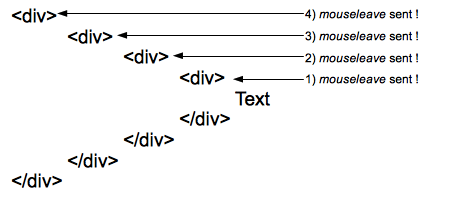
One mouseleave event is sent to each element of the hierarchy when leaving them. Here four events are sent to the four elements of the hierarchy when the pointer moves from the text to an area outside of the most outer div represented here.
Behavior of mouseout events
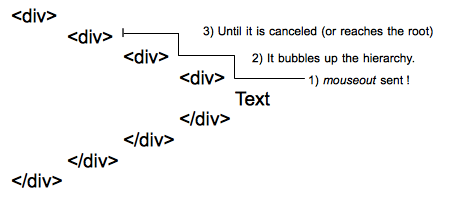
One single mouseout event is sent to the deepest element of the DOM tree, then it bubbles up the hierarchy until it is canceled by a handler or reaches the root.
Examples
The mouseout documentation has an example illustrating the difference between mouseout and mouseleave.
mouseleave
The following trivial example uses the mouseenter event to change the border on the <div> when the mouse enters the space allotted to it. It then adds an item to the list with the number of the mouseenter or mouseleave event.
HTML
<div id="mouseTarget">
  <ul id="unorderedList">
    <li>No events yet!</li>
  </ul>
</div>
CSS
Styling the <div> to make it more visible.
#mouseTarget {
  box-sizing: border-box;
  width: 15rem;
  border: 1px solid #333333;
}
JavaScript
let enterEventCount = 0;
let leaveEventCount = 0;
const mouseTarget = document.getElementById("mouseTarget");
const unorderedList = document.getElementById("unorderedList");

mouseTarget.addEventListener("mouseenter", (e) => {
  mouseTarget.style.border = "5px dotted orange";
  enterEventCount++;
  addListItem(`This is mouseenter event ${enterEventCount}.`);
});

mouseTarget.addEventListener("mouseleave", (e) => {
  mouseTarget.style.border = "1px solid #333333";
  leaveEventCount++;
  addListItem(`This is mouseleave event ${leaveEventCount}.`);
});

function addListItem(text) {
  // Create a new text node using the supplied text
  const newTextNode = document.createTextNode(text);

  // Create a new li element
  const newListItem = document.createElement("li");

  // Add the text node to the li element
  newListItem.appendChild(newTextNode);

  // Add the newly created list item to list
  unorderedList.appendChild(newListItem);
}
Result
Specifications
| Specification |
|---|
| Pointer Events # mouseleave |
| HTML # handler-onmouseleave |