CanvasRenderingContext2D: translate() メソッド
Baseline
広く利用可能
この機能は広く実装されており、多くのバージョンの端末やブラウザーで動作します。2015年7月以降、すべてのブラウザーで利用可能です。
CanvasRenderingContext2D.translate() はキャンバス 2D API のメソッドで、現在の座標変換行列に移動の座標変換を追加します。
構文
js
translate(x, y)
translate() メソッドは、キャンバスとその原点をグリッド上で水平方向に x 単位、垂直方向に y 単位移動させることで、現在の行列に移動の座標変換を追加します。
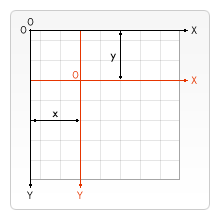
引数
返値
なし (undefined)。
例
図形の移動
この例では、translate()メソッドによってデフォルト位置から移動された正方形を描画します。比較のため、同じサイズの移動されていない正方形も描画しています。
HTML
html
<canvas id="canvas"></canvas>
JavaScript
translate() メソッドはコンテキストを水平方向に 110、垂直方向に 30 移動させます。最初の正方形はデフォルト位置からこれらの量だけシフトされます。
js
const canvas = document.getElementById("canvas");
const ctx = canvas.getContext("2d");

// 正方形を移動
ctx.translate(110, 30);
ctx.fillStyle = "red";
ctx.fillRect(0, 0, 80, 80);

// 現在の変換行列を恒等行列にリセット
ctx.setTransform(1, 0, 0, 1, 0, 0);

// 移動していない正方形
ctx.fillStyle = "gray";
ctx.fillRect(0, 0, 80, 80);
結果
移動された正方形は赤で、移動されていない正方形は灰色です。
仕様書
| 仕様書 |
|---|
| HTML # dom-context-2d-translate-dev |
ブラウザーの互換性
関連情報
- このメソッドを定義しているインターフェイス:
CanvasRenderingContext2D