<feDiffuseLighting>
Baseline
広く利用可能
この機能は広く実装されており、多くのバージョンの端末やブラウザーで動作します。2015年7月以降、すべてのブラウザーで利用可能です。
<feDiffuseLighting> は SVG のフィルタープリミティブで、アルファチャンネルをバンプマップとして使用して画像に照明効果を適用します。その結果得られる画像は RGBA の不透明画像となり、その仕上がりは、光の色、光の位置、および入力されたバンプマップの形状によって決まります。
このフィルタープリミティブによって生成されたライトマップは、<feComposite> フィルタープリミティブの arithmetic 演算子の乗算項を使用して、テクスチャ画像と合成することができます。これらのライトマップを複数個重ね合わせてからテクスチャ画像に適用することで、複数の光源をシミュレートすることができます。
他のフィルタープリミティブと同様に、デフォルトで linearRGB 色空間の色成分を処理します。color-interpolation-filters を使用することで、代わりに sRGB を使用することもできます。
使用コンテキスト
| カテゴリー | フィルター構成要素 |
|---|---|
| 許可されている内容 | Any number of descriptive elements and exactly one light source element, in any order. |
属性
DOM インターフェイス
この要素は SVGFEDiffuseLightingElement インターフェイスを実装しています。
例
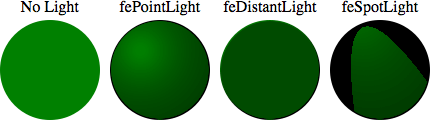
次の例では、利用できるそれぞれの光源を設定した場合に、<feDiffuseLighting>要素が円に与える効果を示しています。いずれの場合も、光は左上隅から決まります。
html
<svg width="440" height="140" xmlns="http://www.w3.org/2000/svg">
  <!-- No light is applied -->
  <text text-anchor="middle" x="60" y="22">No Light</text>
  <circle cx="60" cy="80" r="50" fill="green" />

  <!-- the light source is a fePointLight element -->
  <text text-anchor="middle" x="170" y="22">fePointLight</text>
  <filter id="lightMe1">
    <feDiffuseLighting in="SourceGraphic" result="light" lighting-color="white">
      <fePointLight x="150" y="60" z="20" />
    </feDiffuseLighting>

    <feComposite
      in="SourceGraphic"
      in2="light"
      operator="arithmetic"
      k1="1"
      k2="0"
      k3="0"
      k4="0" />
  </filter>

  <circle cx="170" cy="80" r="50" fill="green" filter="url(#lightMe1)" />

  <!-- the light source is a feDistantLight element -->
  <text text-anchor="middle" x="280" y="22">feDistantLight</text>
  <filter id="lightMe2">
    <feDiffuseLighting in="SourceGraphic" result="light" lighting-color="white">
      <feDistantLight azimuth="240" elevation="20" />
    </feDiffuseLighting>

    <feComposite
      in="SourceGraphic"
      in2="light"
      operator="arithmetic"
      k1="1"
      k2="0"
      k3="0"
      k4="0" />
  </filter>

  <circle cx="280" cy="80" r="50" fill="green" filter="url(#lightMe2)" />

  <!-- the light source is a feSpotLight source -->
  <text text-anchor="middle" x="390" y="22">feSpotLight</text>
  <filter id="lightMe3">
    <feDiffuseLighting in="SourceGraphic" result="light" lighting-color="white">
      <feSpotLight
        x="360"
        y="5"
        z="30"
        limitingConeAngle="20"
        pointsAtX="390"
        pointsAtY="80"
        pointsAtZ="0" />
    </feDiffuseLighting>

    <feComposite
      in="SourceGraphic"
      in2="light"
      operator="arithmetic"
      k1="1"
      k2="0"
      k3="0"
      k4="0" />
  </filter>

  <circle cx="390" cy="80" r="50" fill="green" filter="url(#lightMe3)" />
</svg>
予想されるレンダリング:
ライブレンダリング:
仕様書
| 仕様書 |
|---|
| Filter Effects Module Level 1 # feDiffuseLightingElement |
ブラウザーの互換性
関連情報
- SVG フィルタープリミティブ属性
<filter><feBlend><feColorMatrix><feComponentTransfer><feComposite><feConvolveMatrix><feDisplacementMap><feDistantLight><feFlood><feGaussianBlur><feImage><feMerge><feMorphology><feOffset><fePointLight><feSpecularLighting><feSpotLight><feTile><feTurbulence>- SVG チュートリアル: フィルター効果