PointerEvent: azimuthAngle property
Baseline 2024
Newly available
Since December 2024, this feature works across the latest devices and browser versions. This feature might not work in older devices or browsers.
The azimuthAngle read-only property of the PointerEvent interface represents the angle between the Y-Z plane and the plane containing both the transducer (pointer or stylus) axis and the Y axis.
Depending on the specific hardware and platform, user agents will likely only receive one set of values for the transducer orientation relative to the screen plane — either tiltX and tiltY or altitudeAngle and azimuthAngle.
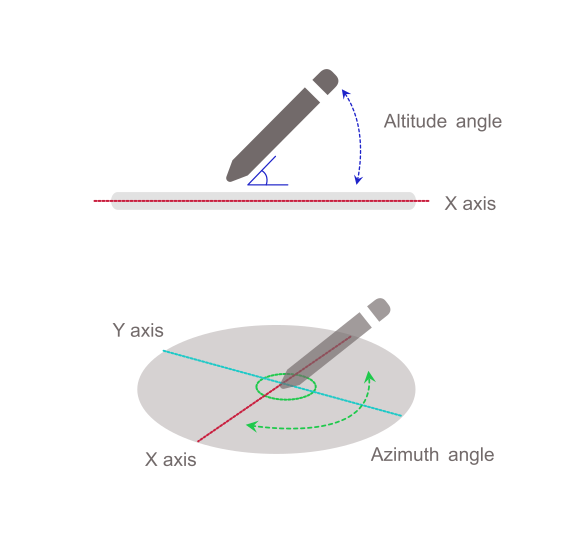
For an additional illustration of this property, see Figure 5 in the specification.
Value
An angle in radians between 0 and 2π where 0 represents a transducer whose cap is pointing in the direction of increasing X values (point to "3 o'clock" if looking straight down) on the X-Y plane, and the values progressively increase when going clockwise (π/2 at "6 o'clock", π at "9 o'clock", 3π/2 at "12 o'clock").
When the transducer is perpendicular to the surface (altitudeAngle of π/2), the value is 0.
For hardware and platforms that do not report tilt or angle, the value is 0.
Example
someElement.addEventListener("pointerdown", (event) => {
  process_angles(event.altitudeAngle, event.azimuthAngle);
});
Specifications
| Specification |
|---|
| Pointer Events # dom-pointerevent-azimuthangle |