Navigation timing
Navigation Timing is part of the Performance API and provides metrics associated with navigating from one page to another. For example, you can determine how much time it takes to load or unload a document, or log the time it took until DOM construction has finished and interaction with the DOM is possible.
Only the current document is included, so usually there is only one PerformanceNavigationTiming object to observe. It extends the PerformanceEntry interface with the entryType of "navigation" and also inherits from PerformanceResourceTiming, so all of the timestamps from the process of fetching the document are available as well.
Navigation timestamps
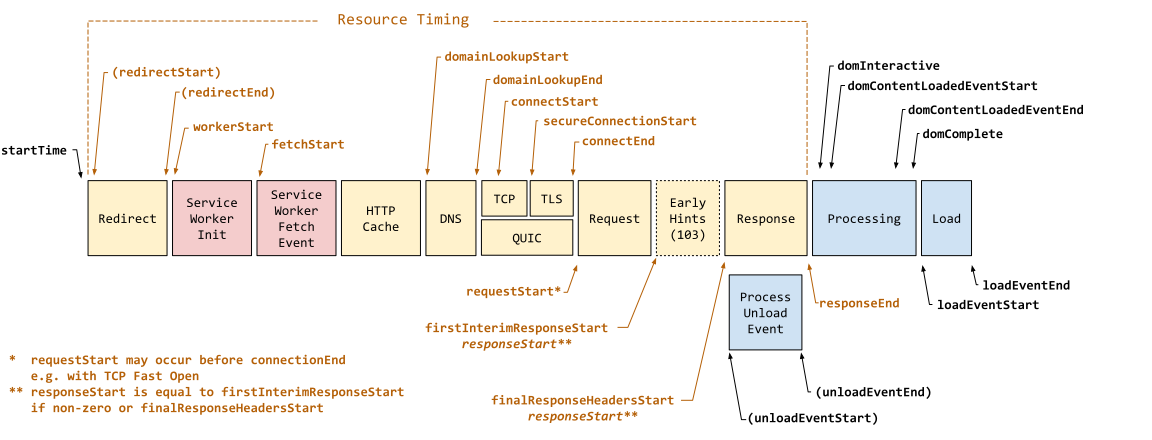 Figure 1. Navigation timestamps (source).
The document navigation timestamps (in addition to those from Resource Timing) are:
startTime: Always 0.unloadEventStart: (if there is a previous document) the timestamp immediately before the current document'sunloadevent handler starts.unloadEventEnd: (if there is a previous document) the timestamp immediately after the current document'sunloadevent handler completes.domInteractive: timestamp when DOM construction is finished and interaction with it from JavaScript is possible.domContentLoadedEventStart: timestamp immediately before the current document'sDOMContentLoadedevent handler starts.domContentLoadedEventEnd: timestamp immediately after the current document'sDOMContentLoadedevent handler completes.domComplete: timestamp when the document and all sub-resources have finished loading.loadEventStart: timestamp immediately before the current document'sloadevent handler starts.loadEventEnd: timestamp immediately after the current document'sloadevent handler completes.
Performance timing confidence
The PerformanceNavigationTiming.confidence property returns a PerformanceTimingConfidence object containing information that indicates whether a performance record reflects typical application performance, or is likely affected by external factors.
For example, if a website has loaded after a browser "cold start" or session restore, its pages may load more slowly as a result. In such cases, a low confidence value would be returned for an associated performance record. On the other hand, if the browser determines a returned performance record to be representative of typical application performance, a high confidence value is returned.
This confidence measure is useful for developers when trying to determine whether a performance issue is a legitimate concern, or an outlier being caused by external factors. See PerformanceTimingConfidence for more information.
Other properties
The PerformanceNavigationTiming interface provides additional properties such as redirectCount returning the number of redirects and type indicating the type of navigation.
Example
The domContentLoadedEventEnd and domContentLoadedEventStart timestamps can be used to measure how long it takes to process the DOMContentLoaded event handler.
This example uses a PerformanceObserver, which notifies the caller about new navigation performance entries as they are recorded in the browser's performance timeline. The example uses the buffered option to access entries that were recorded before the observer was created.
const observer = new PerformanceObserver((list) => {
  list.getEntries().forEach((entry) => {
    const domContentLoadedTime =
      entry.domContentLoadedEventEnd - entry.domContentLoadedEventStart;
    console.log(
      `${entry.name}: DOMContentLoaded processing time: ${domContentLoadedTime}ms`,
    );
  });
});

observer.observe({ type: "navigation", buffered: true });
For more examples, see the property pages in the PerformanceNavigationTiming reference documentation.