Visit Mozilla.org

DOM:element.clientHeight

From MDC

« Gecko DOM Reference

Contents

[edit] Summary

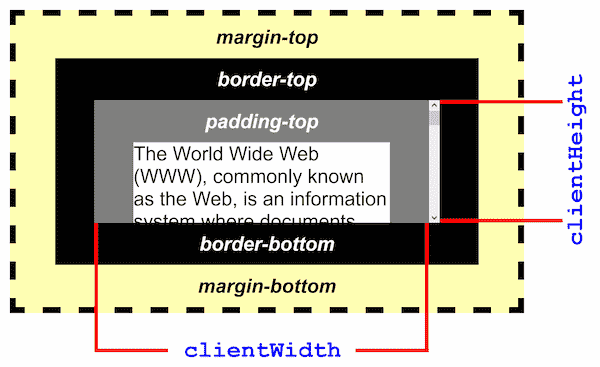
Returns the inner height of an element in pixels, including padding but not the horizontal scrollbar height, border, or margin.

clientHeight can be calculated as CSS height + CSS padding - height of horizontal scrollbar (if present).

[edit] Syntax and values

var h = element.clientHeight;

h is an integer representing the clientHeight of element in pixels.

clientHeight is read–only.

[edit] Example

padding-top

Gentle, individualistic and very loyal, Birman cats fall between Siamese and Persian in character. If you admire cats that are non aggressive, that enjoy being with humans and tend to be on the quiet side, you may well find that Birman cats are just the felines for you.

Image:BirmanCat.jpgAll Birmans have colorpointed features, dark coloration of the face, ears, legs and tail.

Cat image and text coming from http://www.best-cat-art.com/

padding-bottom

LeftTopRightBottommargin-topmargin-bottomborder-topborder-bottom

Image:clientHeight.png

[edit] Specification

Not part of any W3C specification.

[edit] Notes

clientHeight is a non-standard, HTML-specific property introduced in the Internet Explorer object model.

offsetLeft returns the position the upper left edge of the element; not necessarily the 'real' left edge of the element. This is important for span elements in flowed text that wraps from one line to the next. The span may start in the middle of the page and wrap around to the beginning of the next line. The offsetLeft will refer to the left edge of the start of the span, not the left edge of text at the start of the second line. Therefore, a box with the left, top, width and height of offsetLeft, offsetTop, offsetWidth and offsetHeight will not be a bounding box for a span with wrapped text. (And, I can't figure out how to find the leftmost edge of such a span, sigh.)

[edit] References

[edit] See Also